Large Language Models (LLMs) have dramatically changed how we build software. What started as simple chat interfaces has evolved into intelligent systems that can reason, make decisions, interact with external tools, and execute complex workflows autonomously. These systems are commonly known as AI agents.
One of the emerging frameworks in this space is Strands Agents, an open source SDK originally introduced by AWS to simplify the development of autonomous AI agents. Rather than forcing developers to build complex orchestration logic themselves, Strands adopts a model-first approach, where the language model becomes the primary decision maker and the framework provides the building blocks needed to connect the model with tools, services, and other agents.
The goal of Strands is to make agent development accessible without sacrificing flexibility. A developer can create a functional agent with only a few lines of code, then progressively extend it with custom tools, multi-agent collaboration patterns, MCP integrations, workflows, and advanced orchestration techniques as requirements grow. The framework supports integration with Amazon Bedrock, OpenAI-compatible models, AWS services, and external systems through a rich tooling ecosystem.
In practical terms, a Strands agent can be asked a question such as: What is the current weather in Amsterdam?
If the agent has access to a weather tool, it can determine that it lacks the information required to answer directly, invoke the appropriate tool, retrieve the weather data, and formulate a response for the user. The developer does not need to explicitly define every decision point. The model reasons about the problem and decides which actions should be taken.
This may seem simple on the surface, but it introduces several important questions that differentiate an AI agent from a traditional application: How does the agent decide when to call a tool? How does it process the result returned by that tool? How does it determine whether it has enough information to answer the user, or whether additional actions are required?
These questions lead us to one of the most important concepts of Strands Agents: the Agent Loop.
The Agent Loop is the execution cycle that enables an agent to reason, act, observe results, and continue working toward a goal. It is the foundation upon which more advanced capabilities such as workflows, graphs, swarms, and multi-agent systems are built. Understanding this loop is essential because nearly every action performed by a Strands agent ultimately follows this pattern.
In this article, we will:
- Introduce the Strands Agents framework and its core purpose.
- Build a simple weather agent capable of retrieving current weather information for a given location.
- Walk through the code in detail so you understand every piece of it.
- Explore the Agent Loop and understand what happens behind the scenes when an agent reasons and uses tools.
- Lay the groundwork for future articles covering tools, memory, MCP, workflows, graphs, and multi-agent patterns.
By the end of this series, you will understand not only how to build agents with Strands, but also how the framework orchestrates reasoning, tool usage, and collaboration to solve real-world problems.
Table of contents
Recommended knowledge to follow along
- Python experience
- AWS general experience (Amazon Bedrock access is required for this example)
What is Strands Agents?
Strands Agents is an open source Python SDK designed to reduce the complexity of building AI agents. You can find the official repository and documentation at strandsagents.com.
At its core, the framework is built around three primitives:
Agent — The central object. It wraps a language model, a system prompt, and a set of tools. When you send a message to an agent, it enters the Agent Loop and begins reasoning about how to respond.
Tool — A Python function decorated with @tool that the agent can call. Tools are the mechanism by which an agent interacts with the outside world: fetching data, calling APIs, reading files, querying databases, and more.
Model — The underlying LLM provider. Strands supports Amazon Bedrock, Anthropic’s API directly, and OpenAI-compatible endpoints. You configure the model separately and pass it to the agent.
The framework deliberately keeps the developer out of the control flow. You do not write if the model says X, call function Y. Instead, you describe what the agent can do via tools and a system prompt, and the model decides on its own how to proceed. This is what makes Strands a model-first framework.
Setting up the project
To follow along, create a new Python project and install the required dependencies:
pip install strands-agents
pip install strands-agents-tools
pip install python-dotenv
pip install requests
You will also need an AWS account with access to Amazon Bedrock, and a Google API key with the Geocoding API and the Weather API enabled. Store your Google API key in a .env file at the root of your project:
API_KEY=your_google_api_key_hereBuilding the Weather Agent
Let us walk through the complete implementation of the weather agent step by step.
The system prompt
The system prompt is the first thing you define. It sets the context and behavior for the agent — it tells the model who it is, what it can do, and how it should approach problems.
WEATHER_SYSTEM_PROMPT = """You are a weather assistant with HTTP capabilities. You can:

1. Make HTTP requests to the Google Weather API
2. Process and display weather forecast data
3. Provide weather information for locations all over the world

When retrieving weather information:
1. Get the API_KEY from the environment variables. You will use the API KEY for the Google APIs.
2. You can use the Google Geocoder API to retrieve the geolocation based on the city name. You can request from:
https://maps.googleapis.com/maps/api/geocode/json?address={city_name}&key={API_KEY}
3. You can use the Google Weather API to retrieve the current conditions https://weather.googleapis.com/v1/currentConditions:lookup?key={API_KEY}&location.latitude={latitude}&location.longitude={longitude}.

When displaying responses:
- Format weather data in a human-readable way
- Highlight important information like temperature, precipitation, and alerts
- Handle errors appropriately
- Convert technical terms to user-friendly language

Always explain the weather conditions clearly and provide context for the forecast.
"""
Notice something important about the system prompt: it describes a two-step process. To answer a weather question, the agent first needs to convert a city name into geographic coordinates, and then use those coordinates to retrieve the weather. The prompt makes this workflow explicit for the model, so it knows the order of operations.
This is a key design principle in Strands: the system prompt does not just describe the agent’s personality. It guides the model’s reasoning strategy.
Custom tools
Tools are regular Python functions decorated with @tool. The decorator tells Strands that this function can be offered to the model as a callable action. The function’s docstring becomes the tool description that the model reads when deciding whether to use it.
from strands import Agent, tool
from strands.models import BedrockModel
import requests
import os
from dotenv import load_dotenv

load_dotenv()

@tool
def geocode(address: str) -> dict:
    """Convert an address into latitude/longitude."""
    api_key = os.getenv("API_KEY")
    response = requests.get(
        "https://maps.googleapis.com/maps/api/geocode/json",
        params={"address": address, "key": api_key},
    )
    return response.json()["results"][0]["geometry"]["location"]


@tool
def get_weather(latitude: str, longitude: str) -> str:
    """Get current weather for a location."""
    api_key = os.getenv("API_KEY")
    response = requests.get(
        "https://weather.googleapis.com/v1/currentConditions:lookup",
        params={"key": api_key, "location.latitude": latitude, "location.longitude": longitude},
    )
    return response.json()
A few things worth noting here:
The geocode tool takes a plain text address and returns a dictionary with lat and lng keys. The get_weather tool takes those coordinates and returns the raw weather JSON from Google’s API.
The API key is read from environment variables inside each tool function, not returned to the model. This is an important security practice: the model never sees your API key. It only receives the data the tool returns.
The type annotations and docstrings are not decorative. Strands uses them to generate the tool schema that the model reads. A clear docstring and accurate types make the model more likely to call the tool correctly.
The model and agent
model = BedrockModel(
    model_id="global.anthropic.claude-sonnet-4-6",
    region_name="eu-central-1",
)

weather_agent = Agent(
    system_prompt=WEATHER_SYSTEM_PROMPT,
    model=model,
    tools=[geocode, get_weather],
)
BedrockModel wraps Amazon Bedrock’s inference API. The model_id here uses a cross-region inference profile — Bedrock routes requests across regions for better availability.
The Agent constructor takes the system prompt, the model, and the list of tools. This is the complete configuration. There is no routing logic, no conditional branching, no state machine. You hand the agent its capabilities and it takes care of the rest.
Invoking the agent
message = "What's the current weather in Haarlem (The Netherlands)?"
weather_agent(message)
Calling the agent like a function starts the Agent Loop. This single line triggers a complete reasoning and execution cycle that we will now explore in detail.
The Agent Loop
The Agent Loop is the execution model that powers every Strands agent. When you invoke weather_agent(message), Strands does not simply send your message to the LLM and return the reply. Instead, it enters a cycle that continues until the model decides it has a final answer to give you.
Here is what happens step by step when you ask: “What’s the current weather in Haarlem?”
Step 1 — User message received
The agent receives your message and prepares a request to the model. This request includes the system prompt, the conversation history, the user’s message, and the schema of all available tools (geocode and get_weather).
The model now has full context: who it is, what tools it has, and what the user wants.
Step 2 — Model reasons and selects a tool
The model analyses the request. It understands that to answer a weather question about Haarlem, it first needs to know the geographic coordinates of Haarlem. It cannot call get_weather directly because it does not have latitude and longitude yet.
So the model decides to call geocode with the argument "Haarlem, The Netherlands". It returns a response that is not a final answer — it is a tool call.
Step 3 — Strands executes the tool
Strands intercepts the tool call, finds the geocode function in the agent’s tool registry, and executes it with the arguments provided by the model. The function calls the Google Geocoding API and returns something like:
{ "lat": 52.3873878, "lng": 4.6462194 }Step 4 — Result returned to the model
The result of the tool call is added to the conversation context and sent back to the model. The model now knows the coordinates of Haarlem. The loop does not end here — the model must decide what to do next.
Step 5 — Model reasons again and calls a second tool
With the coordinates available, the model now calls get_weather passing the latitude and longitude it just retrieved. Strands executes the tool, the Google Weather API returns the current conditions for that location, and the result goes back to the model.
Step 6 — Model produces a final answer
Now the model has everything it needs. It takes the raw weather data and formats it into a readable response for the user — describing the temperature, sky conditions, precipitation, and anything else relevant. This time, instead of returning a tool call, the model returns a plain text message. Strands recognizes this as the final answer and ends the loop.
Visualising the loop
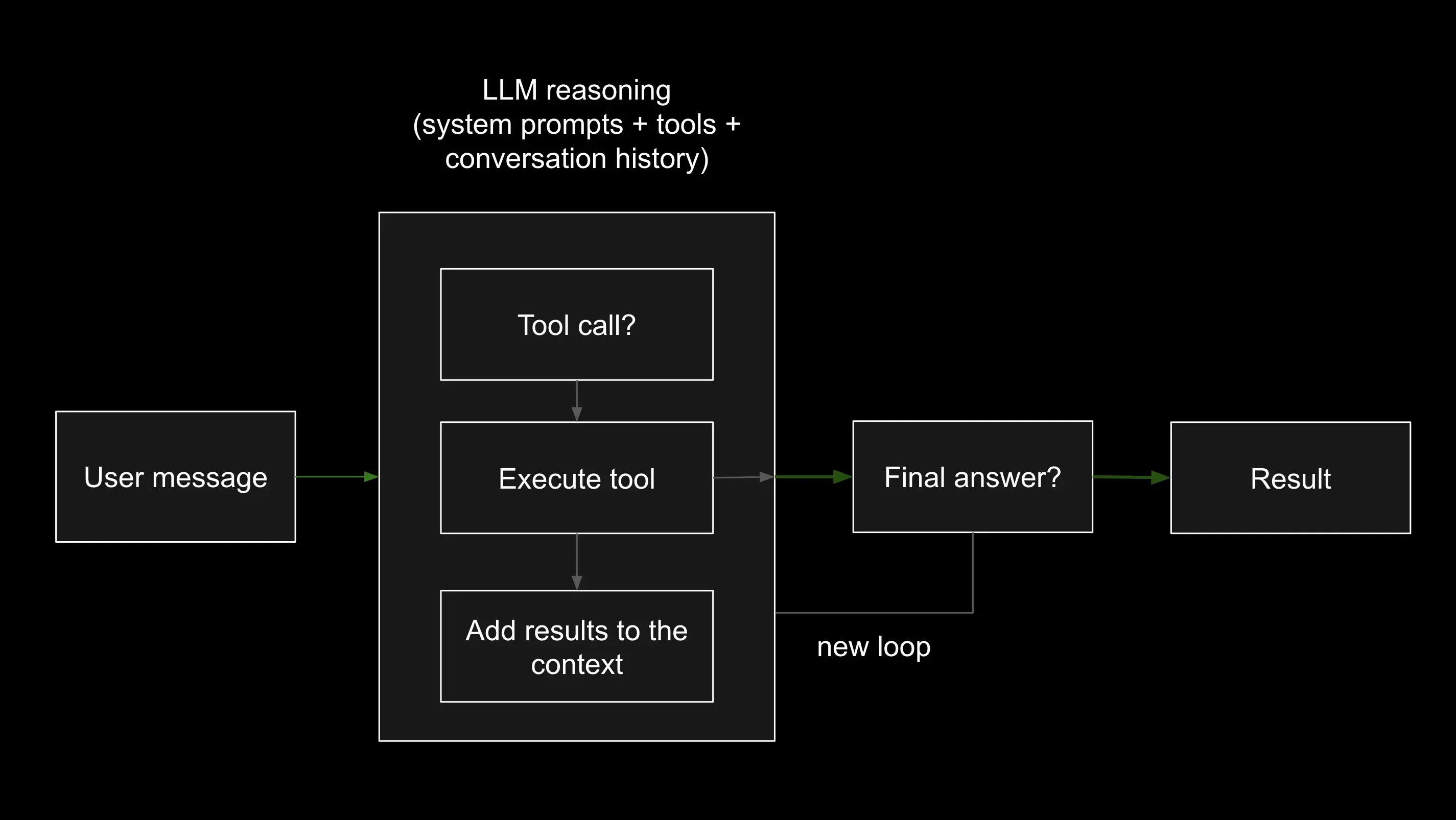
The loop continues for as many iterations as the model needs. In our weather example it runs twice — once for geocoding, once for weather retrieval. A more complex agent might loop five or ten times, calling different tools and accumulating context at each step.
Why this matters
Understanding the Agent Loop changes how you think about building agents. You are not writing procedural code that calls APIs in a fixed sequence. You are describing capabilities and letting the model compose them dynamically based on what the user asks.
This means your agent can handle variations you never explicitly programmed. If the user asks for weather in a place with an ambiguous name, the model might decide to add a clarifying country name before calling geocode. If the geocoding call returns multiple results, the model might pick the most likely one and note the assumption in its response. The reasoning happens inside the loop, and the developer is not required to anticipate every case.
You can read more about how Strands implements the Agent Loop in the official documentation and in the AWS prescriptive guidance for agentic AI frameworks.
Putting it all together
Here is the complete agent.py file for reference:
from strands import Agent, tool
from strands.models import BedrockModel
import requests
import os
from dotenv import load_dotenv

WEATHER_SYSTEM_PROMPT = """You are a weather assistant with HTTP capabilities. You can:

1. Make HTTP requests to the Google Weather API
2. Process and display weather forecast data
3. Provide weather information for locations all over the world

When retrieving weather information:
1. Get the API_KEY from the environment variables.
2. Use the Google Geocoder API to retrieve geolocation based on the city name.
3. Use the Google Weather API to retrieve current conditions.

When displaying responses:
- Format weather data in a human-readable way
- Highlight important information like temperature, precipitation, and alerts
- Convert technical terms to user-friendly language

Always explain the weather conditions clearly and provide context for the forecast.
"""

load_dotenv()

@tool
def geocode(address: str) -> dict:
    """Convert an address into latitude/longitude."""
    api_key = os.getenv("API_KEY")
    response = requests.get(
        "https://maps.googleapis.com/maps/api/geocode/json",
        params={"address": address, "key": api_key},
    )
    return response.json()["results"][0]["geometry"]["location"]


@tool
def get_weather(latitude: str, longitude: str) -> str:
    """Get current weather for a location."""
    api_key = os.getenv("API_KEY")
    response = requests.get(
        "https://weather.googleapis.com/v1/currentConditions:lookup",
        params={"key": api_key, "location.latitude": latitude, "location.longitude": longitude},
    )
    return response.json()


model = BedrockModel(
    model_id="global.anthropic.claude-sonnet-4-6",
    region_name="eu-central-1",
)

weather_agent = Agent(
    system_prompt=WEATHER_SYSTEM_PROMPT,
    model=model,
    tools=[geocode, get_weather],
)

weather_agent("What's the current weather in Haarlem (The Netherlands)?")
Run it with:
python agent.pyYou should see the agent reason through the problem, call both tools in sequence, and return a formatted weather report.
What’s next
This article introduced the core building blocks of Strands Agents and the Agent Loop that powers them. In the next articles of this series we will go deeper into specific concepts:
- Tools — how to design effective tools, handle errors gracefully, and control what the model can and cannot do.
- Memory — how agents can retain context across conversations and sessions.
- MCP (Model Context Protocol) — how to connect agents to external data sources and services using the emerging standard for model integrations.
- Workflows and Graphs — how to compose multiple agents and steps into structured pipelines.
- Multi-agent patterns — swarms, supervisors, and how agents can collaborate to solve problems too complex for a single agent.
The weather example is intentionally simple, but the same pattern — define tools, write a system prompt, invoke the agent — scales to production-grade systems. The Agent Loop does not change. What changes is the complexity of the tools and the sophistication of the reasoning.
You can find the full source code for this example in my learning-roadmap repository under aws/weather-agentic-app.
